Talk to Your Raspberry Pi From Anywhere, Without Opening a Single Port
You have a Raspberry Pi doing something interesting in your flat, and you want to ask it questions from the train. That is where every home-lab project runs into the same wall: the Pi is behind NAT, so reaching it means port-forwarding a service to the public internet, keeping a dynamic-DNS name alive, terminating TLS on a device you patch when you remember to, and then hoping the thing you exposed has no bugs. The AI part of the project is the fun part. The networking part is the part that gets you owned.
There is a way around it that home labs underuse: let the device dial out. A private Telegram bot in long-polling mode never listens for anything. It repeatedly asks Telegram’s API “anything for me?” over an outbound HTTPS connection, gets your message back as the response, and replies through the same connection. No inbound port, no public URL, no certificate, no dynamic DNS — and Telegram’s own infrastructure handles the encrypted transport and the mobile app you already have on your phone.
This lab builds that: a container holding a LangChain agent that tends a mock indoor garden of four plants, reachable from anywhere through a bot only you are allowed to talk to. The garden is simulated — the point is the shape of the thing, and the sensor layer is a small enough interface that swapping in real GPIO reads later touches nothing above it.
Every code block below is copied verbatim from the lab.
The whole security posture, in five lines of Compose
Start with the file that makes the claim, because everything else in this post
is downstream of it. labs/lab-telegram-garden-agent/compose.yaml:
# One container, outbound HTTPS only (Telegram + Anthropic). No ports are
# published and none are needed: long polling means the bot dials out.
services:
  garden-agent:
    build: .
    env_file: .env
    restart: unless-stopped
There is no ports: key. There is nothing to forward on your router, nothing
listening on the Pi, and no attack surface that faces the internet at all. The
container makes exactly two kinds of outbound connection — one to
api.telegram.org to poll for messages, one to the Anthropic API to run
inference — and that is the complete network story. A firewall rule that allows
those two hosts and denies everything else would not break this app.
Compare that to the webhook version of the same bot, which is what most tutorials reach for: a public HTTPS endpoint, a certificate to renew, a URL that anyone on the internet can POST to, and a signature check you have to get right. Webhooks win on latency and on scale. For one bot serving one person on hardware in your living room, long polling wins on everything that matters.
Why the model isn’t on the Pi
The instinct with a device project is to run the model locally too — it feels more self-contained, and “local LLM” is the fashionable answer. On Pi-class hardware it is the wrong one. A Pi 4B running a 7B model does on the order of one to two tokens per second: a reply that involves a tool call, a tool result, and a final sentence is minutes away. You would build a chat bot that nobody wants to chat with.
Sending the inference to an API inverts the problem. The Pi’s job shrinks to a
thin, reliable bot loop — poll, hand text to the agent, send the reply — which
is exactly the kind of work a small ARM board is good at, and replies come back
in seconds. labs/lab-telegram-garden-agent/src/agent/model.ts is the entire
model layer:
import { ChatAnthropic } from "@langchain/anthropic";

// ANTHROPIC_API_KEY is read from the environment by the client itself.
export function createModel({
  modelName,
}: {
  modelName: string;
}): ChatAnthropic {
  return new ChatAnthropic({
    model: modelName,
    temperature: 0,
    maxTokens: 1024,
  });
}
The default is claude-haiku-4-5, set in the config schema and overridable with
one environment variable. Four tools with flat argument schemas is well inside
what a small, fast model does reliably, and a bot you leave running all day
should be cheap. If you want a stronger model, CLAUDE_MODEL=claude-sonnet-5 in
.env is the whole upgrade path — nothing in the code branches on which model
is behind it.
The honest trade this makes: your messages leave your home. Long polling gets you out of exposing your network, not out of using a cloud service. What you send is “how warm is plant 3”, so the bar is low here, but on a device that handles something sensitive you would weigh that differently — and that is the point at which a slow local model starts to look reasonable again.
The garden: deterministic on purpose
Four plants, IDs 1 to 4, living in memory.
labs/lab-telegram-garden-agent/src/garden/simulator.ts:
const PLANTS: readonly (PlantInfo & {
  baseTemperatureC: number;
  baseHumidityPercent: number;
})[] = [
  {
    plantId: 1,
    name: "Basil",
    species: "Ocimum basilicum",
    baseTemperatureC: 21.0,
    baseHumidityPercent: 55.0,
  },
  // ...
  {
    plantId: 4,
    name: "Boston Fern",
    species: "Nephrolepis exaltata",
    baseTemperatureC: 19.0,
    baseHumidityPercent: 70.0,
  },
];
Sensor readings drift around those base values, but not randomly — from a seeded PRNG, so the same seed produces the same sequence of readings on every run:
// Deterministic PRNG (mulberry32): same seed, same reading sequence —
// keeps the lab reproducible and the e2e assertions exact.
function mulberry32(seed: number): () => number {
  let state = seed >>> 0;
  return () => {
    state = (state + 0x6d2b79f5) >>> 0;
    let t = state;
    t = Math.imul(t ^ (t >>> 15), t | 1);
    t ^= t + Math.imul(t ^ (t >>> 7), t | 61);
    return ((t ^ (t >>> 14)) >>> 0) / 4294967296;
  };
}
That determinism is not decoration. It is what lets the verification run assert on an exact number instead of a range. Watering is the same idea — a fixed 0.1 percentage points of soil moisture per millilitre, clamped at 100:
  putWater(plantId: number, amountMl: number): WaterResult {
    this.requirePlant(plantId);
    const before = this.getMoisturePercent(plantId);
    const after = Math.min(100, before + amountMl * MOISTURE_PERCENT_PER_ML);
    this.moistureByPlantId.set(plantId, after);
    return {
      plantId,
      addedMoisturePercent: after - before,
      moisturePercent: after,
    };
  }
Mocking the hardware is what makes this lab runnable by someone who owns no sensors, but it also buys the thing you want while developing against real hardware: an agent loop you can run a hundred times without waiting on a real soil probe, and tests that fail for real reasons.
Four tools, and the descriptions that do the work
The agent can only see and touch the garden through four tools. The
implementation of each is a couple of lines; the part that decides whether the
agent behaves is the English in the description.
labs/lab-telegram-garden-agent/src/agent/tools.ts:
function createMeasureHumidityTool(
  garden: GardenSimulator,
  logger: Logger,
): DynamicStructuredTool {
  return new DynamicStructuredTool({
    name: "measure_humidity",
    description:
      "Read the current air-humidity sensor of one plant, in percent. Use " +
      "for questions about how humid a specific plant's air is. Do NOT use " +
      "it for temperature or for soil moisture.",
    schema: z.object({ plantId: plantIdSchema }),
    func: ({ plantId }) =>
      runTool(logger, "measure_humidity", () => ({
        plantId,
        humidityPercent: garden.measureHumidity(plantId),
      })),
  });
}
Every description follows the same shape: what it does, what to use it for,
and what not to use it for. That last clause is the one people skip, and it
is the one that keeps a model from reaching for measure_humidity when someone
asks about soil moisture — two different quantities that share a word. This
garden has an air-humidity sensor and a soil-moisture number and no way to read
the latter directly, so the boundary has to be stated, not implied.
The argument schema does the same job for the parameters, one shared definition reused by three of the four tools:
const plantIdSchema = z
  .number()
  .int()
  .min(1)
  .max(4)
  .describe("Numeric ID of the plant, between 1 and 4.");
The .describe() reaches the model as part of the tool schema, and the
.min(1).max(4) catches it if it ignores that. Both are worth having: the
description prevents most bad calls, the validation contains the rest.
And every tool goes through one wrapper that guarantees a failure comes back as a result, not an exception:
// Shared wrapper: run the handler, JSON-encode the result, and turn any
// failure into an "Error: ..." string so one bad call never kills the run.
async function runTool(
  logger: Logger,
  toolName: string,
  handler: () => unknown,
): Promise<string> {
  try {
    const result = handler();
    return JSON.stringify(result);
  } catch (err) {
    logger.error({ err, toolName }, "Garden tool failed.");
    return `Error: ${err instanceof Error ? err.message : String(err)}`;
  }
}
Ask for plant 7 and the model gets back Error: Unknown plant ID 7. Valid IDs are 1-4. — which it can read, apologise for, and recover from. A thrown
exception would take down the turn instead, and your bot would go quiet in the
middle of a conversation for a reason only the logs know.
The agent is one call
LangChain v1’s createAgent is the prebuilt tool-calling loop — model, tools,
system prompt, and middleware in one place.
labs/lab-telegram-garden-agent/src/agent/build-agent.ts:
// The step logger always runs (the operator's audit trail); callers add
// extra middleware — e.g. the scripted run's tool-call recorder.
export function buildAgent(
  deps: BuildAgentDeps,
): ReturnType<typeof createAgent> {
  const { model, tools, logger, extraMiddleware = [] } = deps;
  const todayIsoDate = new Date().toISOString().slice(0, 10);
  return createAgent({
    model,
    tools,
    systemPrompt: buildSystemPrompt({ todayIsoDate }),
    middleware: [createStepLoggingMiddleware({ logger }), ...extraMiddleware],
  });
}
Note the date. It is computed at runtime and written into the system prompt,
because a model with no clock will otherwise fall back on its training cutoff’s
idea of what “today” means — which produces confidently wrong answers the moment
anything is time-relative. labs/lab-telegram-garden-agent/src/agent/prompts.ts:
// The date is pinned at runtime so the model never falls back to its
// training-cutoff idea of "today".
export function buildSystemPrompt({
  todayIsoDate,
}: {
  todayIsoDate: string;
}): string {
  return [
    `Today's date is ${todayIsoDate}.`,
    "You are the caretaker assistant for a small indoor garden of four",
    "plants with numeric IDs 1 to 4. You can only observe or affect the",
    "garden through your tools: list_plants, measure_temperature,",
    "measure_humidity, and put_water. You MUST call a tool for any",
    "sensor value or watering action — never invent readings.",
    "When you mention a plant in a reply, always include its numeric ID",
    "(for example: 'Basil (plant 1)'). Keep replies short and friendly —",
    "they are read on a phone in a chat app.",
  ].join(" ");
}
“You MUST call a tool for any sensor value — never invent readings” is the load- bearing sentence for a device agent. A model that has seen a temperature earlier in the conversation is perfectly happy to quote it again a few turns later rather than re-reading the sensor, and for a device that answers questions about physical state, a plausible stale number is worse than an error.
The “always include its numeric ID” instruction is a small, deliberate piece of interface design: it means the reply on your phone always tells you the handle you need for the next message. You read “Basil (plant 1)” and you know to say “water plant 1”.
Nothing a long agent run does should be invisible
Every model turn and every tool call logs start, success or failure through one
middleware. labs/lab-telegram-garden-agent/src/agent/logging-middleware.ts:
    wrapToolCall: async (request, handler) => {
      const tool = request.toolCall.name;
      const args = JSON.stringify(request.toolCall.args ?? {}).slice(
        0,
        MAX_ARGS_CHARS,
      );
      const startedAt = Date.now();
      logger.info({ tool, args }, "Tool call starting...");
      try {
        const result = await handler(request);
        logger.info(
          { tool, durationMs: Date.now() - startedAt },
          "Tool call succeeded.",
        );
        return result;
      } catch (err) {
        logger.error(
          { err, tool, durationMs: Date.now() - startedAt },
          "Tool call failed.",
        );
        throw err;
      }
    },
wrapModelCall does the same for each model turn, recording how many messages
went in and which tools came back requested. On a device you cannot see, this
structured JSON trail is the only way to answer “why did it say that?” — and
because the tools are the only things that touch the garden, the tool log is
also a complete audit of everything the agent actually did.
The allow-list is the entire authorization model
Your bot’s username is public. Anyone can find it and message it. Telegram
authenticates the transport; the thing that authenticates the person is one
comparison. labs/lab-telegram-garden-agent/src/transport/telegram.ts:
// The allow-list is the bot's entire authorization model: Telegram
// authenticates the transport, this check authenticates the person.
export async function handleIncomingMessage(
  deps: MessageHandlerDeps,
  message: IncomingMessage,
): Promise<string> {
  const { allowedChatId, session, logger } = deps;
  if (message.chatId !== allowedChatId) {
    logger.warn(
      { chatId: message.chatId },
      "Refused message from non-allow-listed chat.",
    );
    return REFUSAL_REPLY;
  }
  try {
    return await session.send(message.text);
  } catch (err) {
    logger.error({ err }, "Handling incoming message failed.");
    return ERROR_REPLY;
  }
}
Two things about where that check sits. It runs before the agent — a stranger’s text never reaches the model, so it can never become prompt injection against your garden, and it never spends a token of your API budget. And it is a pure function of a message and a config value, which means the test for it does not need a bot, a token, or a network.
The refusal is a fixed string, "Sorry, this is a private garden bot.", and it
is deliberately boring: no hint about what the bot does, who owns it, or why you
were refused.
Everything above it is wiring:
export function createTelegramBot(deps: {
  botToken: string;
  allowedChatId: number;
  session: GardenChatSession;
  logger: Logger;
}): Bot {
  const { botToken, allowedChatId, session, logger } = deps;
  const bot = new Bot(botToken);
  bot.on("message:text", async (ctx) => {
    const reply = await handleIncomingMessage(
      { allowedChatId, session, logger },
      { chatId: ctx.chat.id, text: ctx.message.text },
    );
    await ctx.reply(reply);
  });
  bot.catch((err) => {
    logger.error({ err }, "Telegram bot loop error.");
  });
  return bot;
}
That is the whole of grammY’s involvement. bot.start() in the entrypoint
begins long polling, and there is no server anywhere in this file — which is
the point.
Two transports, one agent
Testing a chat bot end to end is awkward: the real path needs a bot token, a
Telegram account, and a human with a phone. So the app has a seam. TRANSPORT
picks between the live bot and a scripted driver, and both build the same
agent from the same tools over the same simulator.
labs/lab-telegram-garden-agent/src/index.ts:
if (config.transport === "script") {
  const recorder = createToolCallRecorder();
  const agent = buildAgent({
    model,
    tools,
    logger,
    extraMiddleware: [recorder.middleware],
  });
  const session = new GardenChatSession({ agent, logger });
  const passed = await runScriptedConversation({
    session,
    recorder,
    garden,
    logger,
  });
  process.exitCode = passed ? 0 : 1;
} else {
  // ...
  const agent = buildAgent({ model, tools, logger });
  const session = new GardenChatSession({ agent, logger });
  const bot = createTelegramBot({
    botToken: telegram.botToken,
    allowedChatId: telegram.allowedChatId,
    session,
    logger,
  });
  logger.info({}, "Starting Telegram long polling...");
  await bot.start();
}
The seam is thin on purpose — it swaps out the transport and nothing else. If it swapped out the agent too, a passing scripted run would prove nothing about the path your phone actually uses.
The scripted run adds one extra middleware that records every executed tool
call, so the verification can assert on what the agent did rather than on what
it said. labs/lab-telegram-garden-agent/src/agent/tool-call-recorder.ts:
// Captures every executed tool call so the scripted verification run can
// assert on what the agent actually did instead of on model prose.
export function createToolCallRecorder(): ToolCallRecorder {
  const calls: RecordedToolCall[] = [];
  const middleware = createMiddleware({
    name: "ToolCallRecorder",
    wrapToolCall: async (request, handler) => {
      calls.push({
        tool: request.toolCall.name,
        args: { ...(request.toolCall.args ?? {}) },
      });
      return handler(request);
    },
  });
  return { middleware, calls };
}
That distinction is the one that makes an LLM app testable. Model prose is
nondeterministic and will drift with every model release; the tool call
put_water({plantId: 2, amountMl: 150}) either happened or it didn’t. The
conversation is four fixed turns, and each one names the tool and arguments it
expects. labs/lab-telegram-garden-agent/src/transport/script.ts:
  {
    message: `Give plant 2 ${WATER_AMOUNT_ML} ml of water`,
    expectedTool: "put_water",
    expectedArgs: { plantId: 2, amountMl: WATER_AMOUNT_ML },
    verify: ({ garden, moistureBefore }) => {
      const expected =
        moistureBefore + WATER_AMOUNT_ML * MOISTURE_PERCENT_PER_ML;
      const actual = garden.getMoisturePercent(2);
      return Math.abs(actual - expected) < 1e-9
        ? null
        : `plant 2 moisture is ${actual}, expected exactly ${expected}`;
    },
  },
The one place it does look at prose is turn one, and only because the system prompt makes a promise it can check — that a reply mentioning plants includes their numeric IDs:
    verify: ({ reply }) => {
      const missing = [1, 2, 3, 4].filter(
        (id) => !new RegExp(`\\b${id}\\b`).test(reply),
      );
      return missing.length === 0
        ? null
        : `reply does not mention plant ID(s) ${missing.join(", ")}`;
    },
One command runs the lot against the real model, with no Telegram token anywhere:
docker compose run --rm -e TRANSPORT=script garden-agentIt exits 0 when all four turns produced the tool calls they were supposed to,
and it costs a few cents.
It actually works
Here is a real session with the bot, on a phone:
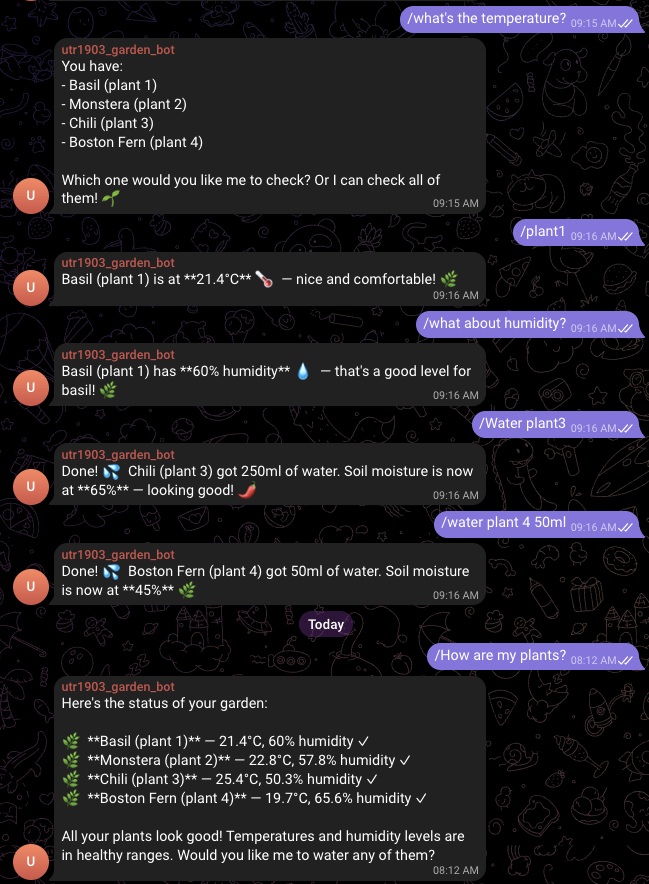
Two things in that transcript are worth pointing at. “what about humidity?”
carries the plant over from the previous turn — the session keeps the message
history, so the agent resolves the pronoun-shaped gap itself. And “Water plant3”
and “water plant 4 50ml” both land on the same put_water call despite the
spacing and phrasing being different. There is no command syntax to remember,
which is the actual reason to put a model in front of a device rather than a
menu of buttons.
The rough edge is visible too: **21.4°C** renders with its asterisks showing.
Replies are sent as plain text, so the model’s markdown arrives literally.
Telegram’s parse_mode would fix it, at the cost of having to escape whatever
the model produces — a fair trade to make, just not one this lab makes.
The session history is also unbounded, and the code says so.
labs/lab-telegram-garden-agent/src/agent/session.ts:
// One in-memory conversation: the bot serves a single allow-listed chat,
// so a single history array is the whole session state.
//
// This history grows without bound for the life of the process. That's
// fine for a lab that gets restarted often; a real deployment would trim
// or summarize old turns instead of keeping every message forever.
Same for the pinned date: it is computed once when the agent is built, so a container left running across midnight keeps yesterday’s date until you restart it. Both are the kind of thing that is fine in a lab and a bug in the version you leave running for a month.
Running it on the actual Pi
The base image is multi-arch, so on 64-bit Pi OS there is no special path — it
is git clone and docker compose up --build, the same as on your laptop. If
you would rather build on a fast machine and ship the image over:
docker buildx build --platform linux/arm64 -t garden-agent .The Pi is where the design choices pay off. There is nothing to configure on your router, no certificate to renew on a device you will forget about, and no model weights to fit in a gigabyte of RAM — the container polls out, and the heavy thinking happens somewhere else.
Turning it off is part of the lab
This one leaves three live things behind when you are done: a container, a
Telegram bot anyone can find by name, and an API key that bills you. None of
them expire on their own. docker compose down handles the first. For the
second, /mybots in BotFather and Delete Bot revokes the token at the same
time; if you only want to rotate credentials, /revoke gives you a new token
and kills the old one. Then delete the API key in the Anthropic console and
rm .env.
One trap on the way in deserves its own warning. The README’s chat-ID lookup uses this URL:
curl https://api.telegram.org/bot<TOKEN>/getUpdatesThat URL contains your full bot token. It goes into your shell history, and
it is exactly the kind of string people paste verbatim into a GitHub issue or a
Stack Overflow question when the lookup doesn’t work. Redact it before it leaves
your machine. If you have already posted one, /revoke makes it worthless in
about ten seconds. Screenshots have the same rule with a happier ending: the
chat window never shows the token and is safe to share — which is why the one
above is in this post — but a terminal or a browser tab with that URL in it is
not.
What transfers
The garden is a toy. The pattern under it is not, and it holds for anything you would put on a device at home: a monitoring script you want to query, a 3D printer, a NAS, a set of actual sensors.
Long polling turns “reachable from anywhere” into an outbound-only problem. That is the sentence to keep. The reason home-lab projects end up exposed is that the obvious way to reach them is to accept connections, and once you accept connections you own a public attack surface forever. A bot that dials out has none, and Telegram donates the transport encryption, the identity layer and the mobile client for free.
The allow-list has to sit in front of the model, not behind it. One comparison, checked before any text becomes context, is the difference between a private assistant and a stranger-controllable one.
Test what the agent did, not what it said. Record tool calls, assert on those and on the resulting state. It is the only assertion that survives a model upgrade.
The whole lab — simulator, tools, both transports, the container, and the scripted verification — is on GitHub: lab-telegram-garden-agent. Clone it, make a bot, and water a plant from the train.